
Instagram is no longer just a visual sharing platform; it’s one of the top 3 channels where 29% of users buy. With users actively discovering and purchasing products, brands need the right Instagram marketing tools to stand out and drive meaningful engagement in 2025.
I’ve reviewed dozens of marketing platforms, automation tools, and analytics suites over the past few years and seen which apps drive real engagement, streamline workflows, and provide actionable insights.
In selecting these top 13 tools, I’ve prioritised those that excel in advanced analytics, social listening, influencer identification, full scheduling, and multi-account integration, key criteria for brands of all sizes.
Automation and deep audience insights can increase Instagram engagement by up to double, so using the right tools isn’t optional; it’s a growth necessity for 2025.
I have divided marketing tools for Instagram into the following categories:
- Instagram Marketing Tools for Scheduling and Management
- Instagram Marketing Tool for Analytics and Reporting
- Best Marketing Tool for Instagram Hashtag and Content Discovery
- Instagram Tool for Influencer Marketing
- Marketing Tool for Instagram Ad Management
- Instagram Marketing Tool for Content Creation and Design
What Are Instagram Marketing Tools and What Do They Do?
They are designed to handle specific tasks that are either impossible or incredibly time-consuming to do manually on Instagram. Here’s a direct breakdown of what they actually do for your brand on the platform:
Marketing tools on Instagram range from free tools like Instagram Insights to advanced Instagram management tools like SocialPilot and Sprout Social. These solutions help streamline workflows, automate tasks, and deliver insights to boost engagement and brand growth.
1. They Streamline Content Creation and Design
Tailored for Instagram formats, these tools let you:
- Create Reels, Stories, and carousels with trending audio and templates
- Design grid-friendly visuals and perfect-size posts
- Use AI to generate captions and hashtags
2. They Automate Your Publishing Schedule
Stay consistent with features like:
- Auto-scheduling for all post types at peak times
- Visual feed planning with drag-and-drop grids
- First-comment hashtag automation
3. They Provide Actionable Analytics and Reporting
Move beyond native Insights:
- Track Reel engagement, Story drop-offs, follower growth
- Find the best posting times based on real data
- Generate reports that tie content to clicks and conversions
4. They Manage Community Engagement
Centralize all interactions:
- Unified inbox for comments and DMs
- Auto-replies for common queries
- Monitor brand mentions and tags
5. They Sharpen Your Competitive Strategy
Make data-driven decisions by:
- Benchmarking performance against competitors
- Tracking top-performing content in your niche
- Analyzing hashtag impact
6. They Uncover Trends and User-Generated Content (UGC)
Stay ahead with social listening:
- Catch viral trends early
- Discover user-generated content to repost
- Track sentiment and brand mentions
7. They Optimize Your “Link in Bio” for Conversion
Turn one link into many actions:
- Create branded landing pages with multiple links
- Build shoppable galleries from your posts
- Track clicks and sales from bio traffic
If you’re exploring options that go beyond Instagram, it’s worth checking out this detailed guide on the best social media marketing tools.
13 Best Instagram Marketing Tools in 2025
Now that we have learnt about the different types of tools, let’s talk about each of these tools in great detail, discussing their features, strengths, and unique capabilities.
 SocialPilot |
 Buffer |
 Later |
|
|---|---|---|---|
| Pricing | $30/Month | $36/Month | $30/Month |
| Best for | Agencies & Small Businesses | SMBs & Brands | Brands & Creators |
| Instagram Profiles | 7 | 6 | 3 |
| Ease of Use | |||
| Support | |||
| Publishing | |||
| Direct Instagram Publishing |  |
|
|
| Story Scheduling | Direct publishing and mobile notifications |
Direct publishing and mobile notifications |
Only from desktop app |
| Collaboration Post | |
 |
|
| Smart Queues | |
|
|
| Repeat Posts | |
|
|
| Calendar View | |
|
Confusing |
| Auto Post From RSS Feeds | |
|
|
| Bulk Scheduling | (500 Posts) |
|
|
| First Comment | Instagram, Facebook, and LinkedIn | Instagram only | |
| Link Shorteners | Bitly, Sniply, and Rebrandly |
Unknown |
|
| Post Creation | |||
| Draft Your Posts | |
|
|
| Image Editor | Custom Instagram sizing |
|
|
| AI Assistant | |
|
|
| Hashtag Generator | (Aligned with captions) |
|
Limited capability |
| Holiday Calendar | |
|
|
| Canva Integration | (On all plans) |
|
|
| Media From External Sources | |
(Not from cloud storage) |
Only Google Drive and Dropbox |
| Content Library | |
|
|
| Image Tagging | |
|
|
| Auto-Watermarking posts | |
Not automation |
Manually |
| Location Tagging | |
(Only for Instagram) |
|
| Custom Reel thumbnail | |
Only stills from video |
|
| Link-in-bio | |
|
|
| Instagram Collaboration Post | |
|
|
| Team Collaboration | |||
| Content Approval Workflows | (Quick and Easy) |
(Basic) |
|
| Multi-User Collaboration Per Post | |
|
|
| Comments on Post | |
(No tagging) |
|
| Client Management | (Unlimited clients) |
|
|
| Engagement | |||
| Social Inbox | (Unified Inbox) |
(Limited features) |
Limited |
| Reply to DMs & Comments | |
(Only Facebook & Instagram) |
Partial |
| Reply to Reviews & Queries | |
|
|
| Analytics | |||
| Detailed Social Media Analytics | (Easy to read) |
(Lacking depth of insights) |
|
| Post Performance | |
|
|
| Custom Report Builder | |
|
|
| Auto-Schedule Report Sharing to Clients | |
|
|
| White Label | |||
| White Label Dashboard | |
|
|
| Branded Downloadable Report | |
|
|
| Support | |||
| Priority Customer Support | |
|
|
| Try for Free | Learn More | Learn More | |
Best Instagram Marketing Tools for Scheduling and Management
Best for:
Marketing Agencies, SMBs, Multi-Location Brands & Professionals
Rating:
4.5/5 (G2) & 4.4/5 (Capterra)
Social Media Platform Supported:
Facebook, Instagram, X (Twitter), LinkedIn, TikTok, YouTube, Pinterest, Google Business Profile, Instagram Threads, and Bluesky.
About SocialPilot:
SocialPilot makes Instagram content scheduling and publishing easy for businesses and agencies managing multiple accounts.
From one dashboard, you can upload images, write captions, and schedule posts across multiple Instagram accounts. Its smart scheduling feature will pick the best times for each account to get the most reach and engagement.
The drag and drop calendar gives you a visual view of your posting schedule, while staggered and repeat scheduling will avoid overlaps and keep evergreen content live.
SocialPilot also supports bulk scheduling via CSV uploads for content-heavy brands and approval workflow, where clients can review and approve posts without logging in.
It’s for Instagram marketing teams who need to be consistent, organized, and efficient.
Key Features of SocialPilot:
- Multi-account scheduling for Instagram posts, carousels, and reels
- Smart scheduling with optimized posting times
- Drag-and-drop Instagram content calendar
- Bulk scheduling via CSV upload
- Staggered scheduling to avoid overlapping posts
- AI-generated captions and hashtag suggestions
- First comment scheduling for hashtags or CTAs
- Post approval workflows via shareable links
- Team collaboration with role-based access
- Instagram analytics for engagement, reach, and growth
- Custom-branded Instagram reports for clients
SocialPilot Pricing
SocialPilot offers a 14-day free trial and access to all premium features (no credit card required & cancel any time). Choose a plan that fits your needs.
| Ultimate | Premium | Standard | Essentials |
$170.00/mo$200
Billed annually (Save 15%)
|
$85.00/mo$100
Billed annually (Save 15%)
|
$42.50/mo$50
Billed annually (Save 15%)
|
$25.50/mo$30
Billed annually (Save 15%)
|
|
Simplify Instagram Scheduling with SocialPilot
|
|||

Best for:
Social media managers, professionals, entrepreneurs, and small businesses
Ratings:
4.3/5 (G2)
Social Media Platforms Supported:
Instagram, Facebook, Google Business Profile, LinkedIn, Mastodon, Pinterest, Shopify, Threads, TikTok, Twitter / X, YouTube
About Buffer:
When it comes to pure, uncomplicated scheduling and publishing, Buffer has been a reliable workhorse in my toolkit for years. I’ve always appreciated its clean, no-fuss interface that gets the job done without overwhelming me with features I don’t need. For me, its core strength lies in its simplicity and reliability for Instagram.
You can queue up all your content, Reels, Stories, and Carousels—and trust that it will go live without a hitch. The visual grid planner is fantastic for curating that perfect feed aesthetic before you commit.
What I find particularly useful is the ability to schedule my block of hashtags to post in the first comment automatically, keeping my captions clean and focused. If you want to take the chaos out of your content calendar and reclaim your time, Buffer is an incredibly solid and dependable choice.
Who Should Not Buy Buffer:
Anyone looking for advanced Instagram analytics, in-depth hashtag research, or influencer management features should probably skip Buffer.
Pricing:
Buffer provides four pricing options along with a 14-day trial period for each. There is a free plan for beginners. Paid plans range from $6 a month for one account to $120/month for 10 accounts. To better understand the platform’s value, explore our detailed breakdown of Buffer’s pricing plans and what each tier offers for Instagram marketing.
Best for:
Creators, freelancers, agencies, social media managers, and small businesses
Ratings:
4.5/5 (G2), 4.4/5 (Capterra)
Social Media Platforms Supported:
Instagram, TikTok, Facebook, Pinterest, YouTube, LinkedIn, and X (Twitter)
About Later:
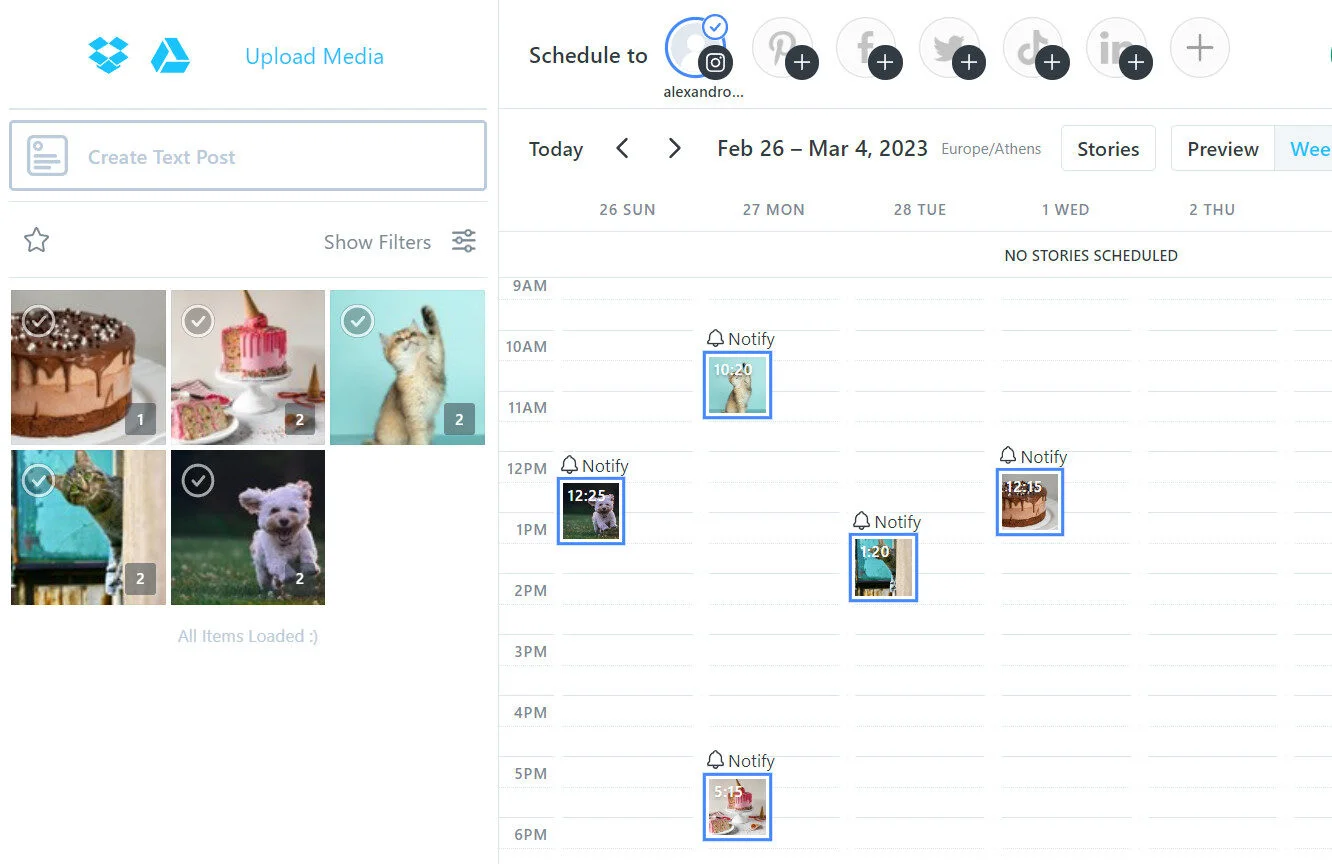
Instagram is a visual platform, so it only makes sense that your planning tool should be visual-first. This is precisely where, in my experience, Later has always dominated. For anyone who obsesses over their feed’s aesthetic, their drag-and-drop Visual Planner is an absolute game-changer. It gives you a live preview of your grid as you schedule, allowing you to perfect the flow and feel of your content before anything is published.
But Later’s real power comes from its seamless integration of scheduling with commerce. The Linkin.bio feature is brilliant, transforming your feed into a clickable, shoppable landing page that drives real traffic and sales. Being able to auto-publish everything from Reels to multi-photo posts while simultaneously building out a mini-website from your bio makes it more than just a scheduler; it’s a visual command center for creators and e-commerce brands.
Who Should Not Buy Later:
Anyone looking for advanced analytics, in-depth engagement tracking, or full automation across multiple platforms beyond Instagram should probably skip Later.
Pricing:
Later presents three subscription choices, each accompanied by a 14-day complimentary trial period, followed by paid levels starting with Starter, valued at $25, Growth at $45, and the final choice, the Advanced option, priced at $80. You can get a complete overview of what each plan offers in our Later pricing breakdown to see which tier fits your Instagram strategy best.
Best Marketing Tool Instagram for Analytics and Reporting
Best for:
Freelancers, large enterprises, medium-sized, and small businesses
Ratings:
4.5/5 (G2)
Social Media Platforms Supported:
Instagram, Facebook, X (Twitter), LinkedIn, and TikTok
About Iconosquare:
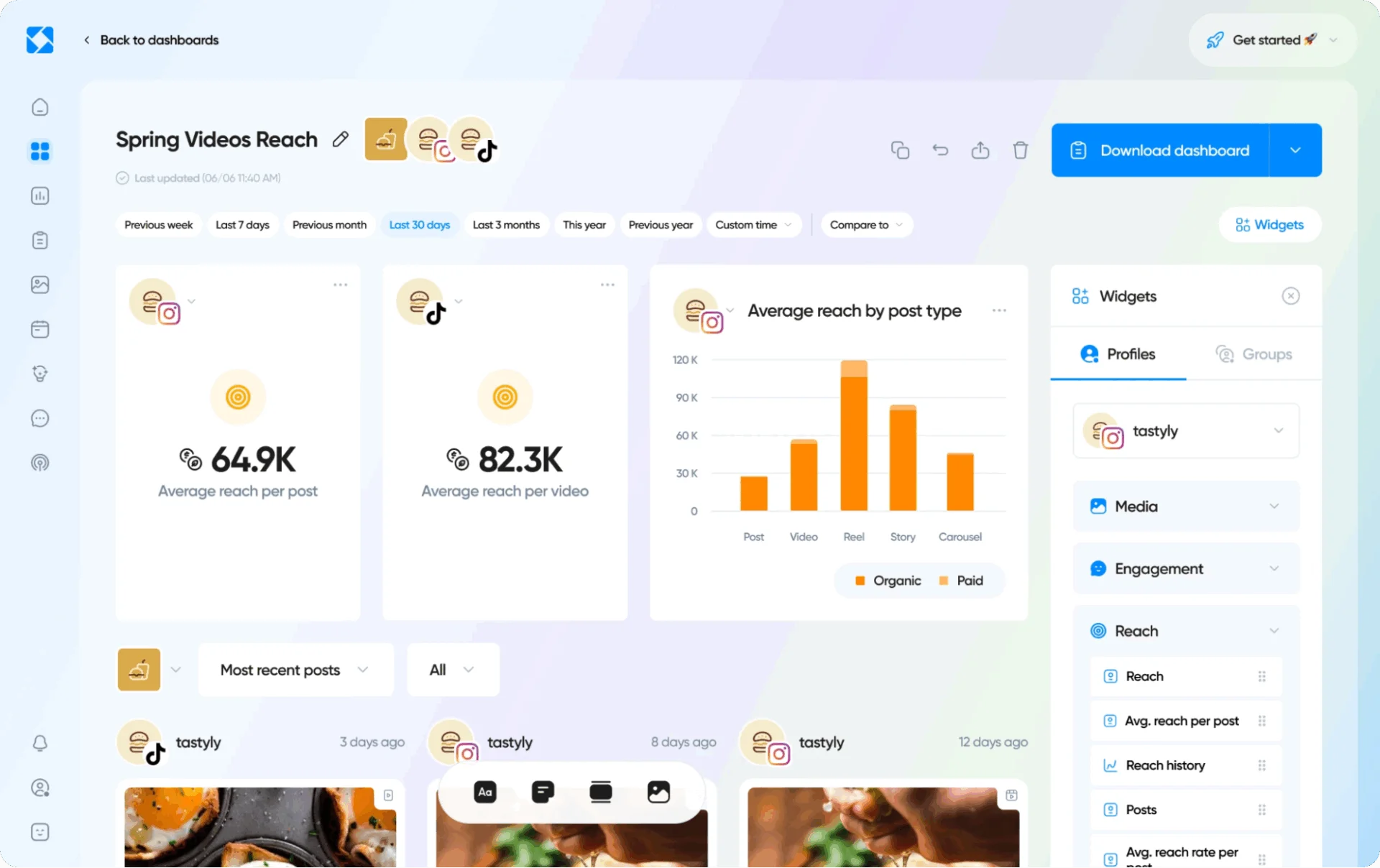
If you’re someone who loves digging into the numbers (like I do), Iconosquare is a tool you’ll genuinely appreciate. I’ve used it mainly for Instagram analytics and reporting, and honestly, it gives far more detailed insights than Instagram’s native dashboard ever could. From tracking follower growth and engagement rates to identifying the best times to post based on actual performance data — it’s all there.
What I personally like is how clean and customizable the reports are. I’ve used them to create client-facing reports without having to manually pull data or design anything. It even breaks down how each type of content (Stories, Reels, carousels) is performing, which helps when refining your content strategy.
If Instagram analytics play a big role in how you make decisions, Iconosquare is one of the most dependable tools I’ve worked with.
Who Should Not Buy Iconosquare:
Anyone who doesn’t need deep analytics or manages only one account may find it overwhelming and not worth the cost.
Pricing:
Iconosquare has two defined pricing plans, with some visible loopholes. The Single plan starts at $59 with a single user, supporting five profiles, and the Teams plan at $99 supports 10 users for the same number of accounts. The price of these plans increases for every five accounts you add on. However, the Single plan can’t be stretched to manage more than 10 accounts.
Best for:
Social media consultants, established brands, and enterprises
Ratings:
4.4/5 (G2) & 4.4/5 (Capterra)
Social Media Platforms Supported:
Facebook, X, Instagram, LinkedIn, Threads, Pinterest, TikTok, and YouTube
About Sprout Social:
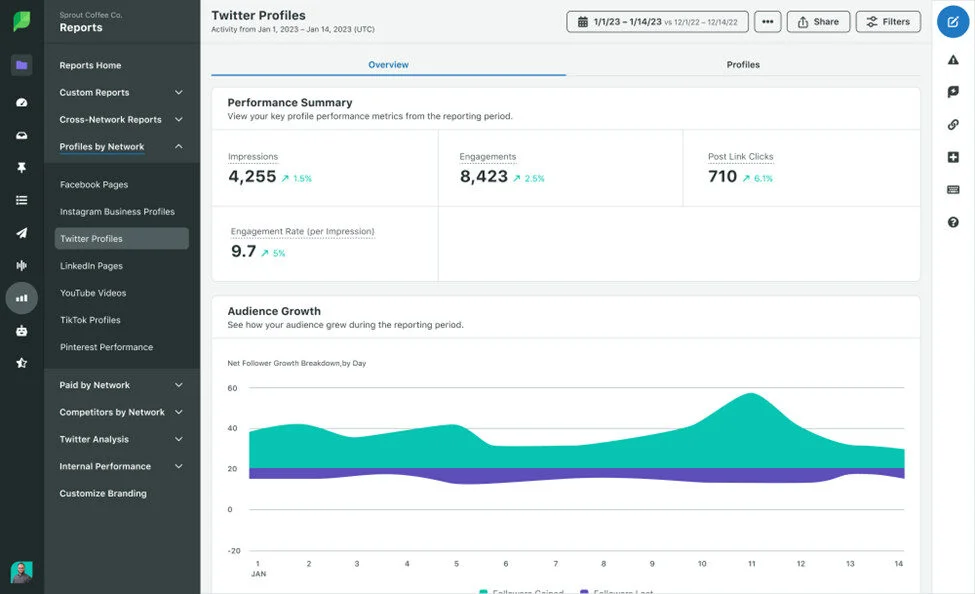
I use Sprout Social when I need enterprise-level reporting for Instagram, especially when working with teams or agencies. What I love most is how comprehensive and clean the analytics dashboards are. You’re not just getting surface-level metrics; it digs into engagement trends, audience demographics, hashtag performance, and even how your Instagram is performing vs competitors.
One feature I’ve personally used is the automated reporting. You can schedule reports to be emailed weekly or monthly, which is a huge time saver when managing multiple clients. You can also filter by post type (Reels vs Stories), which helps in making data-driven content decisions.
If you’re serious about scaling and need deep, presentation-ready insights, Sprout Social has been one of the tools in my stack.
Who Should Not Buy Sprout Social:
Those with a tight budget or simple analytics needs may find it too expensive and feature-heavy for basic Instagram use.
Pricing:
Sprout Social has three paid plans ranging from the Standard plan at $199 per user/month, the Professional at $299 per user/month, and the Advanced at $399/month. For a closer look at plan details and cost structures, refer to our complete Sprout Social pricing guide.
Best Marketing Tool for Instagram Hashtag and Content Discovery
Best for:
Individual marketers, small to mid-sized businesses, and social media agencies
Ratings:
4.2/5 (G2)
Social Media Platforms Supported:
Instagram, Facebook, Twitter, Pinterest, and LinkedIn
About RiteTag:
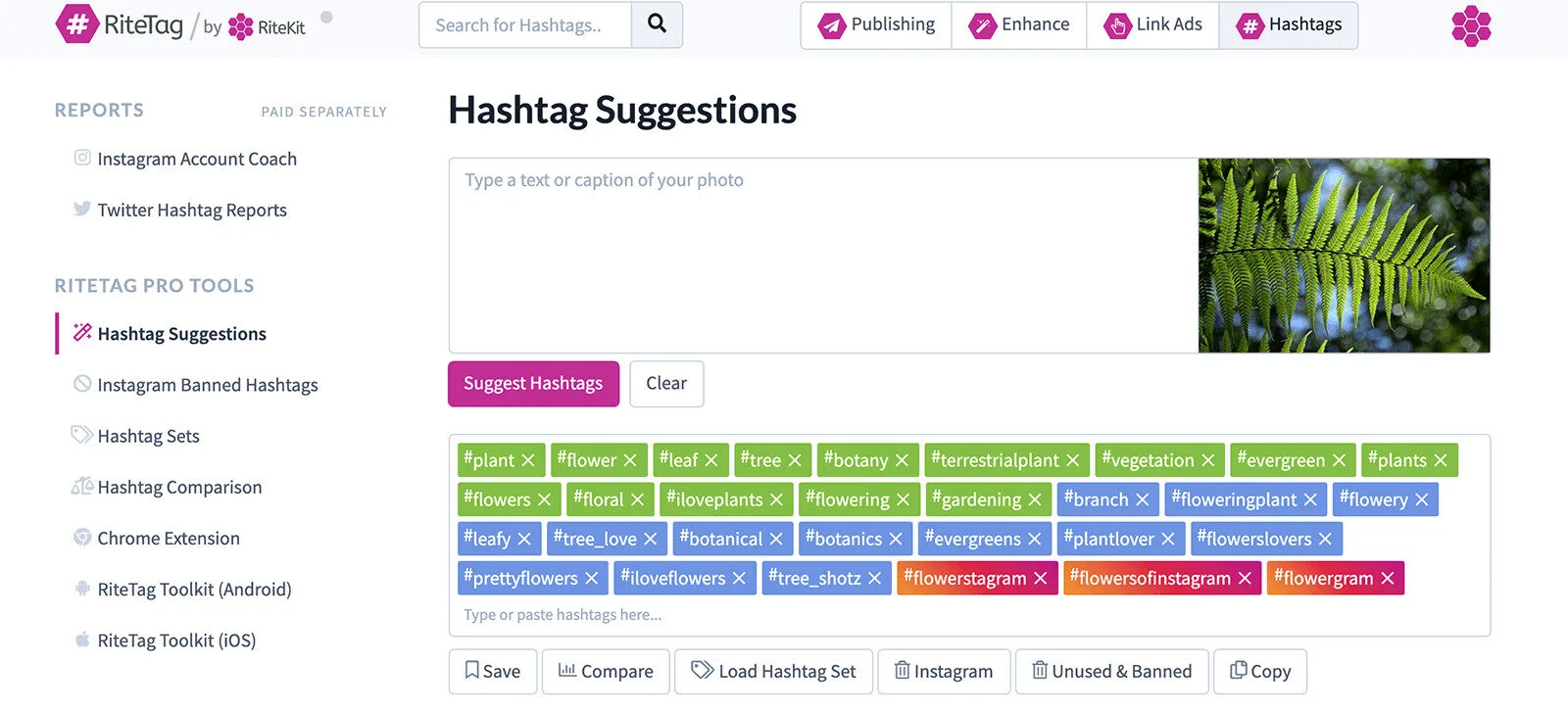
I use RiteTag when I need to find the right hashtags for an Instagram post, especially when I don’t have 30 minutes to research. What I love is that it gives me real-time suggestions based on the image or text I’m about to post. It literally analyzes the content and suggests hashtags that are trending now or have long-term engagement.
It also color codes hashtag performance, like which ones are too popular to compete in or which have better visibility over time, so I don’t have to second-guess. I’ve seen a noticeable increase in reach when using its suggestions vs random tags.
If you’re serious about using hashtags strategically instead of guessing, RiteTag makes that process so much faster and smarter without having to do any deep research.
Who Should Not Buy RiteTag:
Anyone looking for a full-suite Instagram marketing tool or in-depth analytics will find RiteTag too limited in functionality.
Pricing:
RiteTag offers a 7-day free trial. The individual license is priced at $49 per year. This standalone subscription includes access to its web platform, browser extensions, and mobile apps. RiteTag can also be acquired as part of the more comprehensive RiteKit Package, which costs $65 per month or $650 per year.
Best for:
Businesses, social media marketers, digital marketing agencies, influencers
Ratings:
5/5 (Capterra), 4.3/5 (Spotsaas)
Social Media Platforms Supported:
Twitter, Instagram, Facebook, LinkedIn, YouTube, and TikTok
About Hashtagify:
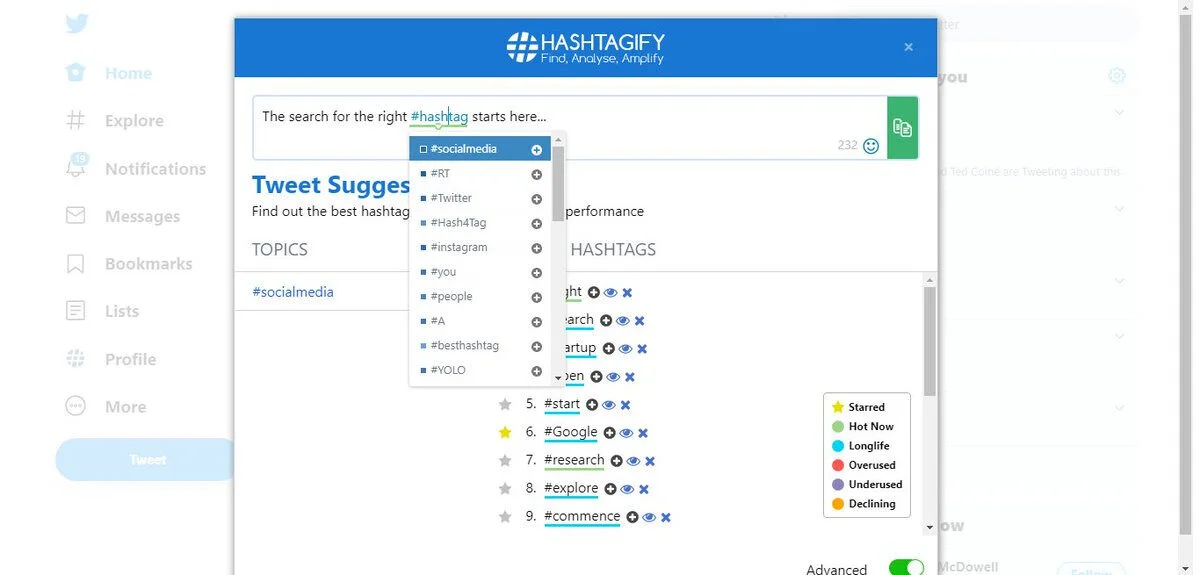
I’ve used Hashtagify to save myself hours of guesswork when it comes to finding the right hashtags for Instagram. I use it to find hashtags that are trending but also relevant to my content and audience. I love the live data it gives — popularity scores, related hashtags, and how competitive a hashtag is.
It’s not just about picking the most popular tags — I use Hashtagify to find niche hashtags that will get my posts in front of the right people. The content discovery is also super helpful when I’m trying to spot trends in my niche or figure out what kind of content is performing under certain tags.
If you take your hashtag strategy seriously and want more than just random suggestions, this tool is a good one in my experience.
Who Should Not Buy Hashtagify:
Anyone looking for Instagram-specific hashtag insights may find Hashtagify too broad and more focused on Twitter than Instagram.
Pricing:
Hashtagify offers a tiered pricing structure to suit different needs – the Personal plan starts at $29 on a monthly basis, the Business plan is priced at $86 monthly, and the Enterprise plan comes in at $311 monthly. It also provides a free trial period.
Instagram Tool for Influencer Marketing
Best for:
E-commerce Brands, D2C Companies, Businesses focused on affiliate marketing, and Digital Marketing Agencies
Ratings:
4.6/5 (G2)
Social Media Platforms Supported:
Instagram, TikTok, YouTube, Twitch, X (formerly Twitter), and Pinterest
About Upfluence:
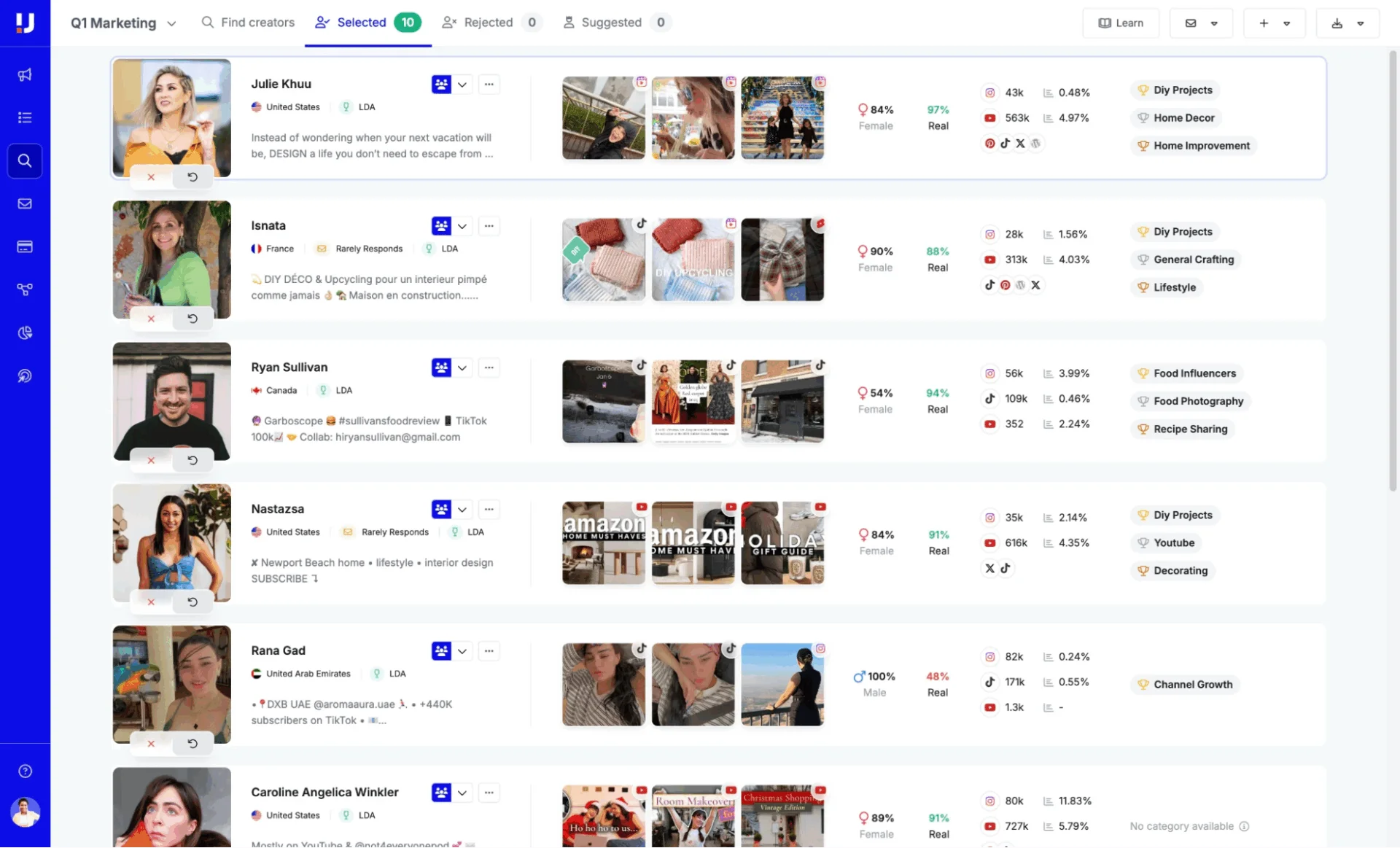
When it comes to running influencer campaigns on Instagram, Upfluence has been a total game-changer for me. I’ve used it mainly to find creators that actually fit a brand’s niche and audience, not just big follower counts. What I love is how deep the search filters go; you can find influencers based on engagement rate, audience demographics, location, and even the type of content they post.
One thing I personally find useful is the ability to manage the entire influencer workflow within the platform, from outreach to tracking performance. It keeps everything organized, especially when you’re juggling multiple campaigns at once.
If you work with influencers regularly and want a system that helps you find the right people (not just popular ones), Upfluence makes the whole process more strategic and less of a shot in the dark.
Who Should Not Buy Upfluence:
Brands with a limited budget or running only occasional influencer campaigns may find Upfluence too expensive and feature-heavy for their needs.
Pricing:
Upfluence does not publish fixed pricing on its website. However, some reports mention that there are three-tiered plans: Growth, Scale, and Enterprise, starting from $478 per month.

Best for:
E-commerce Brands, Direct-to-Consumer (DTC) Companies, Mid to Large-Sized Businesses, Brands Focused on Inbound Creator Partnerships
Ratings:
4.6/5 (G2)
Social Media Platforms Supported:
Meta (Instagram/Facebook), TikTok, Pinterest, YouTube, and Instagram for Business
About Aspire:
Aspire has been one of the best tools I’ve used when running influencer campaigns on Instagram. What I love about it is how it simplifies the whole process, from finding the right creators to outreach, contracts, content approvals, and performance tracking, all in one place.
The influencer discovery feature is super powerful. You can filter creators by niche, engagement rate, follower count, and even content style, which saves hours of manual scouting. I’ve used Aspire for small and large-scale campaigns, and what I found most helpful is the reporting; you can actually see how each influencer’s content performed in terms of reach, clicks, and conversions.
If you’re taking influencer marketing seriously and want to keep everything organized, Aspire is one of the best tools I’ve used.
Who Should Not Buy Aspire:
Brands with a small budget or those running only occasional influencer collaborations may find Aspire too complex and costly for their needs.
Pricing:
Aspire follows a custom pricing model. Reports from industry sources suggest pricing typically starts around $2,499 per month.
Marketing Tool Instagram for Ad Management
Best for:
Businesses of all sizes, Marketers targeting Facebook and Instagram audiences
Ratings:
4.2/5 (G2)
Social Media Platforms Supported:
Facebook Pages, Instagram profiles, Messenger, Facebook Shops, and Meta Business Suite
About Facebook Ads Manager:
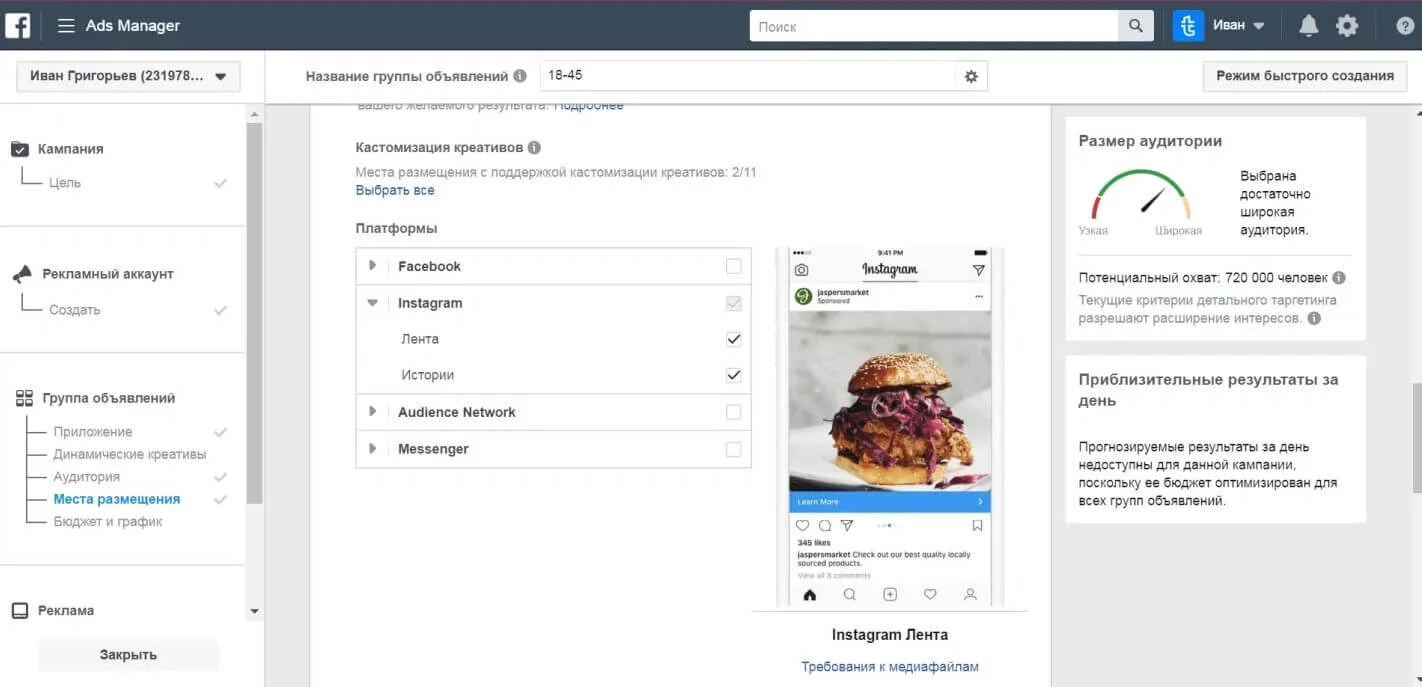
If you’re running paid campaigns on Instagram, I still use Facebook Ads Manager, and honestly, it’s more powerful than most third-party platforms. What I like is the level of control it gives over targeting, placements, and budgeting. Since Instagram ads run through Meta’s system, you can get super specific with who sees your content, down to behaviors, interests, and even custom audiences.
I’ve used it to manage everything from quick story promos to full-funnel ad campaigns, and it’s great for A/B testing creatives and formats. The reporting dashboard takes a little time to get used to, but once you’re in, it’s crazy detailed.
It’s not the most beginner-friendly tool, but if you want to really optimize and scale Instagram ads, there’s no beating running them natively through Ads Manager.
Who Should Not Use Facebook Ads Manager:
Anyone new to Instagram advertising or looking for a simple, beginner-friendly interface may find it too complex and overwhelming to navigate.
Pricing:
Facebook Ads Manager itself is free to use; there’s no subscription fee for accessing the platform. Instead, advertisers pay directly for the cost of their ads, which is determined by factors like audience targeting, competition, ad placements, and campaign objectives.
Best for:
Small to Medium Businesses (SMBs), E-commerce Businesses, and Digital Marketing Agencies
Ratings:
3.6/5 (G2)
Social Media Platforms Supported:
Facebook, Instagram, Google, and Google Ads
About AdEspresso:
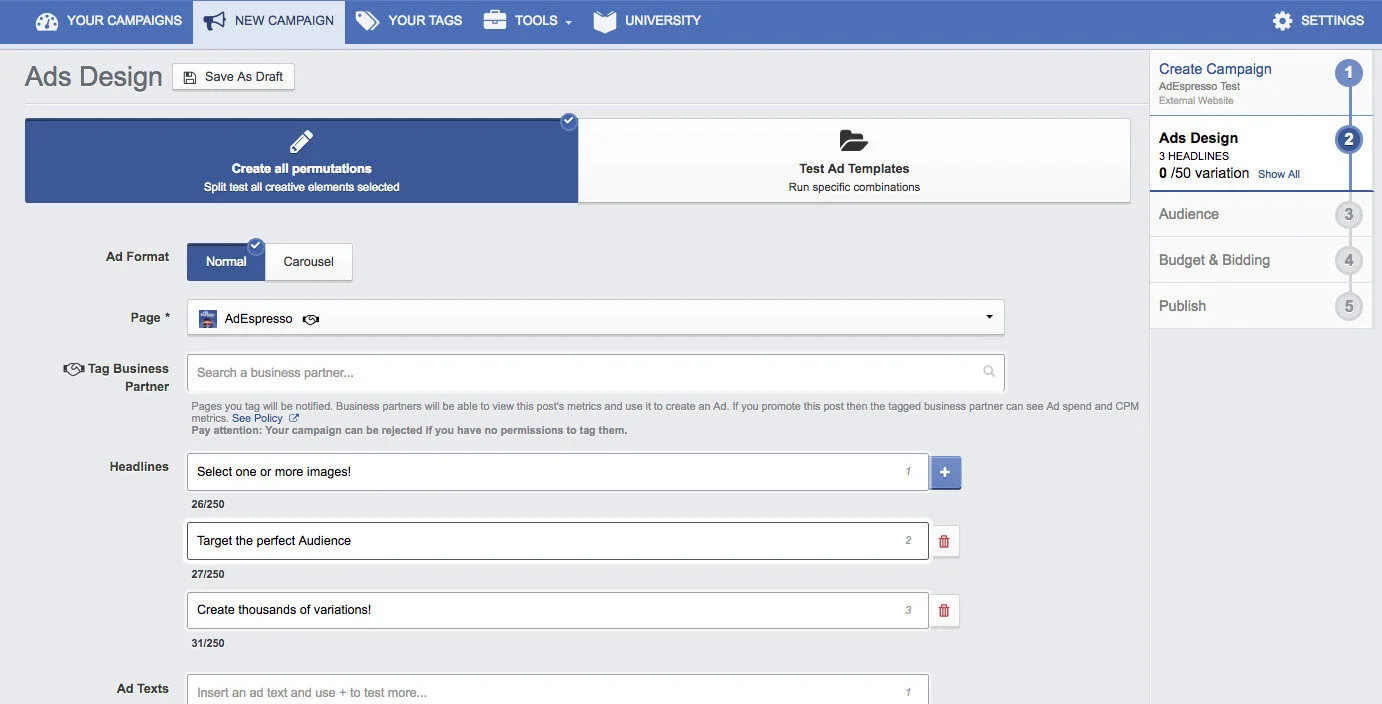
When it comes to running Instagram ads, AdEspresso is the tool I keep coming back to, especially when I need to test multiple ad variations quickly. What I personally like is how beginner-friendly it is, without losing the power you need for more advanced campaigns. It breaks down ad creation, targeting, A/B testing, and performance tracking in a really simple, visual way.
One feature I rely on is the ability to create and test multiple versions of an ad in one go, with different images, captions, CTAs, and AdEspresso handles the split testing automatically. Plus, the reporting is actually easy to understand, unlike the overwhelming Meta Ads dashboard.
If you’re managing Instagram ads and want more control without the usual complexity, AdEspresso makes the whole process faster, clearer, and honestly a lot less frustrating.
Who Should Not Buy AdEspresso:
Marketers running low-budget or very simple Instagram ad campaigns may find it too advanced and unnecessary for basic needs.
Pricing:
The Starter Plan begins at $49/month for ad spends up to $3,000. The Plus Plan costs $99–$149/month. The Elite Plan ($259–$299/month). The Diamond Plan is $499/month for ad spends up to $150,000, while Enterprise plans offer custom solutions for higher budgets. A 14-day free trial is also available.
Instagram Marketing Tool for Content Creation and Design
Best for:
Small businesses, E-commerce businesses, Social media managers, Content creators, Teams, and Agencies
Ratings:
4.7/5 (G2)
Social Media Platforms Supported:
Facebook, Instagram, LinkedIn, Pinterest, Google Drive, and Google Photos
About Canva:
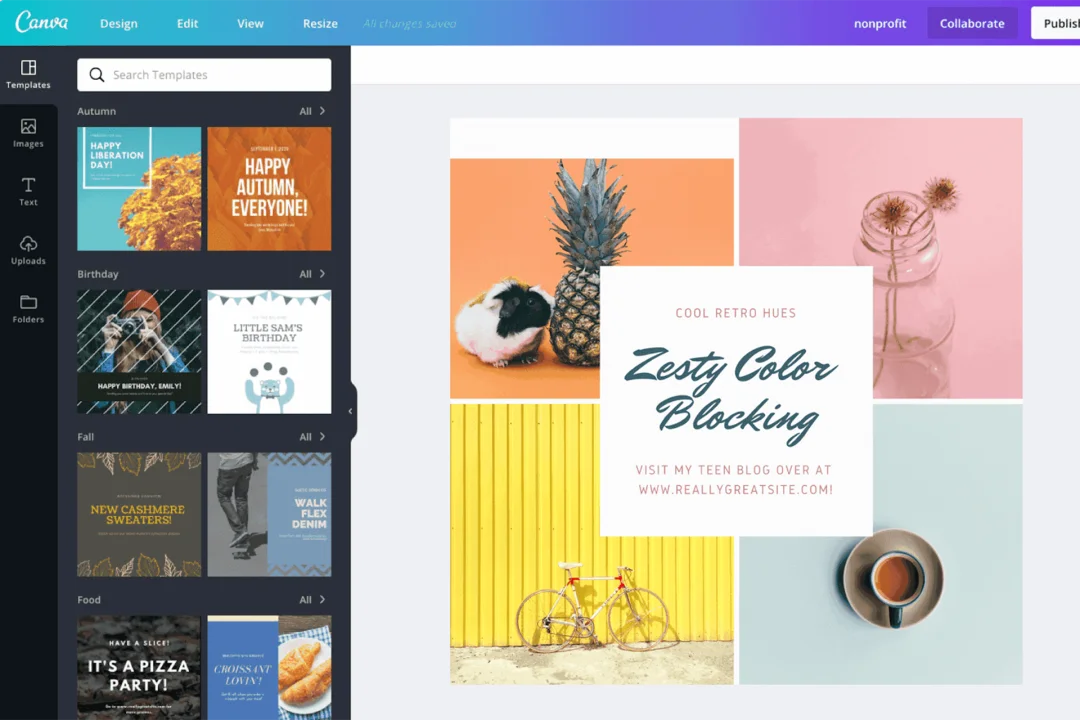
When it comes to creating Instagram posts, Reels covers, or Stories, I always reach for Canva. I’m not a designer, but Canva makes me feel like one. What I love is that I can customise templates that are already optimised for Instagram dimensions, no resizing or guessing needed.
The drag-and-drop editor is fast, and I can save brand colours, fonts, and logo elements, so everything is consistent. I use it to create carousel posts and motion graphics for Reels, all without touching advanced design software.
What works for me is that I can go from idea to ready to post in under 15 minutes. If you need to create polished, scroll-stopping visuals without hiring a designer, Canva has been a total game-changer for my Instagram workflow.
Who Should Not Use Canva:
Anyone looking for advanced design capabilities or highly customized visuals may find Canva too limited compared to professional design tools like Adobe Illustrator.
Pricing:
Canva follows a freemium pricing model. The Pro plan costs $14.99/month (or $119.99/year), the Teams plan costs $29.99/month, and the Enterprise plans have custom pricing.
Best for:
Non-designers, beginners, small businesses, e-commerce businesses, social media managers, content creators, and agencies
Ratings:
4.5/5 (G2)
Social Media Platforms Supported:
Facebook, Instagram, TikTok, Pinterest, and LinkedIn
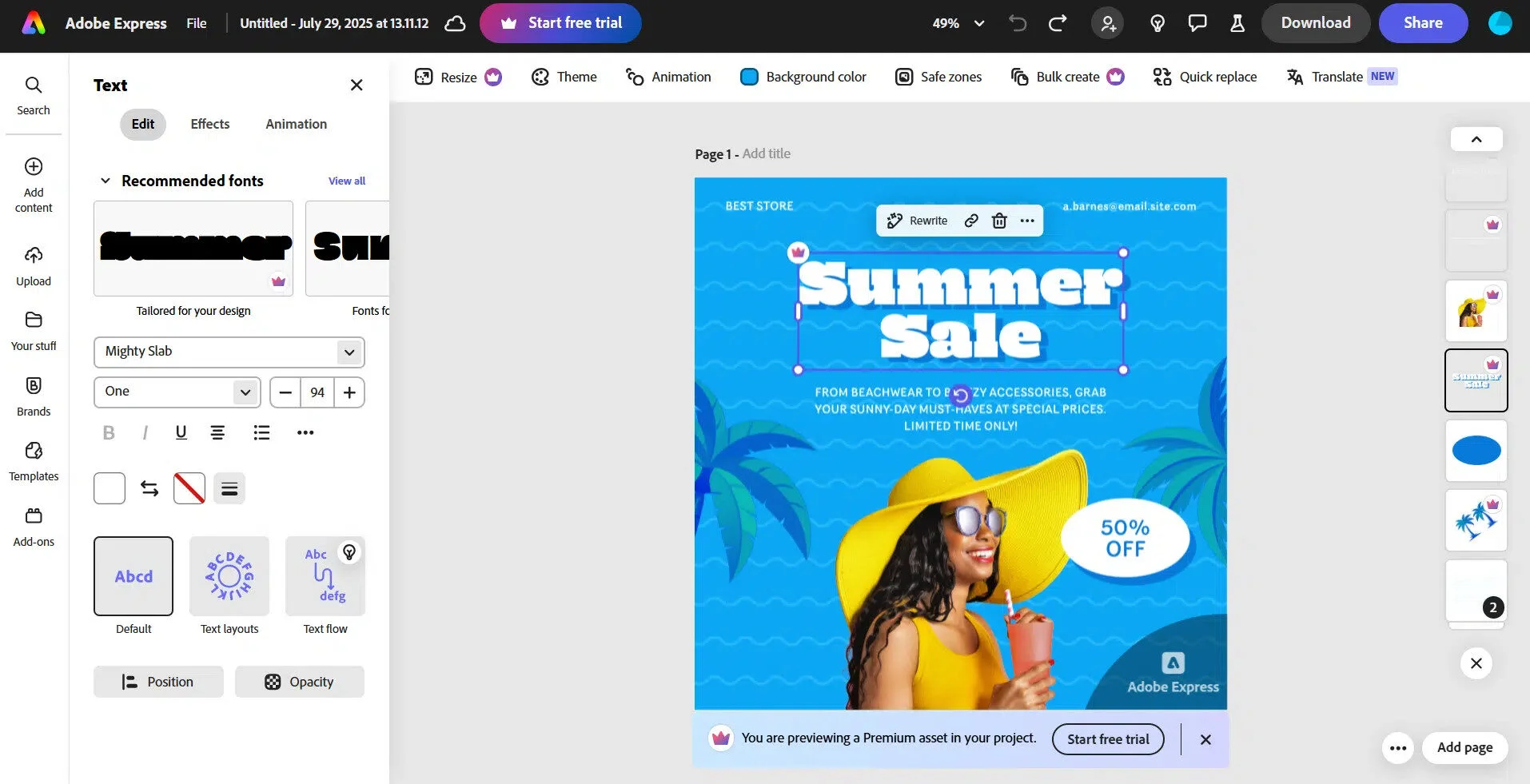
About Adobe Express:
I’ve been using Adobe Express to create professional-looking content without spending hours designing. What I love is how easy it is to start with one of their Instagram-specific templates, whether it’s a Reel cover, Story, or carousel post; everything feels optimized for the platform.
The brand kit is a huge time saver, too. Once I upload my brand colours, fonts, and logos, I can reuse them across all content; it’s not as complex as Photoshop, and that’s the point: you get just enough control to make great-looking posts fast.
For someone who wants polished, scroll-stopping Instagram content without being a full-on designer, Adobe Express is the gap filler for me.
Who Should Not Use Adobe Express:
Users looking for advanced video editing or complex design features may find Adobe Express too limited for professional-level content creation.
Pricing:
Adobe Express offers a Free plan. For advanced features, the Premium plan costs $9.99/month (or $99.99/year), and the Team plan starts at $12.99/month per seat, which includes all premium features. All paid plans include a 30-day free trial.
How to Choose the Right Instagram Marketing Tool
In the previous section, we’ve put together a list of different Instagram tools. But choosing one from all the above can be tough.
We recommend that you evaluate your business to see what features you need the tool to have. Here are a few things to consider while evaluating your options.
- Pricing: Start by deciding how much you are willing to spend. Some tools are free or affordable, while others are for enterprise-level budgets.
- Features You Need: Make a list of must-haves – whether it’s scheduling, analytics, influencer management, ad optimization, or content design. Don’t overpay for features you won’t use.
- Team Size & Collaboration: Solo creators may only need simple scheduling, while larger teams need tools with approval workflows, client sharing, and multi-user access.
- Business Goals: Think about what you want to achieve—faster audience growth, stronger brand presence, or direct sales. The right tool should align with your core objectives.
If you want an all-in-one yet affordable solution for scheduling, analytics, and team collaboration, try SocialPilot’s free trial
Making the Smart Choice for Your Brand
Instagram is rolling out new features that empower businesses of all sizes, especially small and mid-sized ones, to thrive. To keep up with the platform’s evolution, it’s important to invest in marketing tools that grow with it.
The key is to find the right Instagram tools for your business needs. Whether that’s using analytics to understand performance, partnering with influencers through dedicated platforms, or creating stunning visuals with new design tools, building the right toolkit is what sets you up for success.
But if you’re looking for an all-in-one solution that balances scheduling, analytics, and team workflows without the heavy price tag, SocialPilot has you covered
Explore SocialPilot Pricing options to start your free trial today.
Frequently Asked Questions
Which Instagram marketing tool is best?
There is no single "best" tool, as the ideal choice depends on your specific goals and business needs. For all-in-one management, tools like SocialPilot, Hootsuite, or Later are top contenders that offer scheduling, analytics, and engagement features.
If you’re focused on influencer marketing, tools like Upfluence or AspireIQ work well, while Canva and Adobe Express are best for design. Brands can also combine tools, such as using a scheduler tool alongside a design app, for optimal results.
What tools do influencers use for Instagram?
Influencers use a variety of tools to manage and grow their presence, often combining several to cover all their needs. Some such tools are:
- SocialPilot, Later, or Buffer for scheduling
- Flick and RiteTag for hashtag discovery
- InShot for quick video editing
- AspireIQ or Upfluence to manage brand collaborations
Are there free Instagram marketing tools?
Yes, many effective and free options are available. Tools like Buffer and Later offer a free, albeit limited, plan that can be used for scheduling and basic analytics. Tools like Meta’s native Facebook Ads Manager and Canva can also be used at no cost. Many premium tools also offer free trials, like SocialPilot’s 14-day trial.
Can Instagram tools improve ROI?
Yes, when used strategically, Instagram tools can significantly improve your return on investment (ROI) by making your marketing efforts more efficient and effective.
These tools help you schedule consistently, analyze performance, optimize ads, and track influencer campaigns, thus ensuring that every marketing dollar is spent effectively. Besides improving ROI, they also help with higher engagement and smarter campaigns.
About the Author